
Design Packaging Dielines and Preview Your Box in 3D
Create custom box structures, add your artwork, explore realistic 3D previews, and prepare packaging files — all in your browser.
- Free to start
- No signup to design
- Live 2D & 3D
- Open .boxproj files
How DielineDock works
Four steps from an empty canvas to a box you can review, all in one browser workspace.
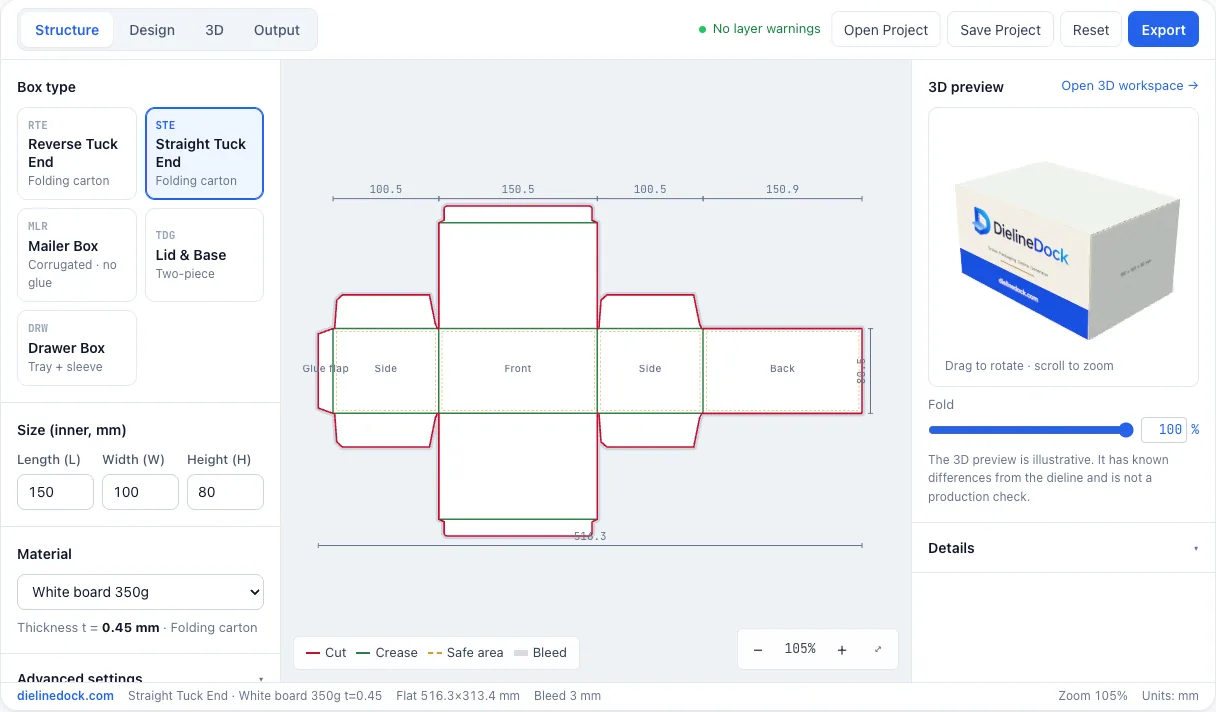
Choose your box structure
Start from one of five styles: Straight Tuck End, Reverse Tuck End, Mailer Box, Lid & Base or Drawer Box.
Open this step →Set dimensions and materials
Enter inside length, width and height in millimetres and pick a board. Thickness compensation is added automatically.
Open this step →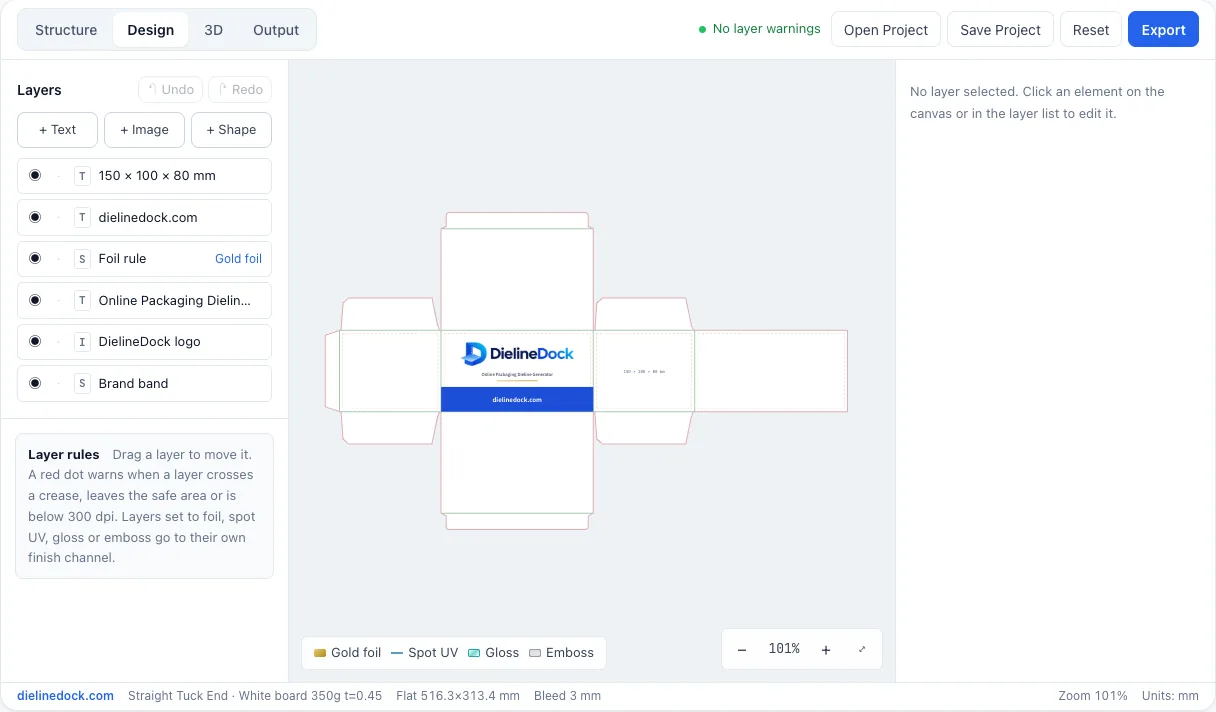
Add artwork and preview in 3D
Place text, images and colour blocks on each panel, then watch the box fold in a live 3D preview.
Open this step →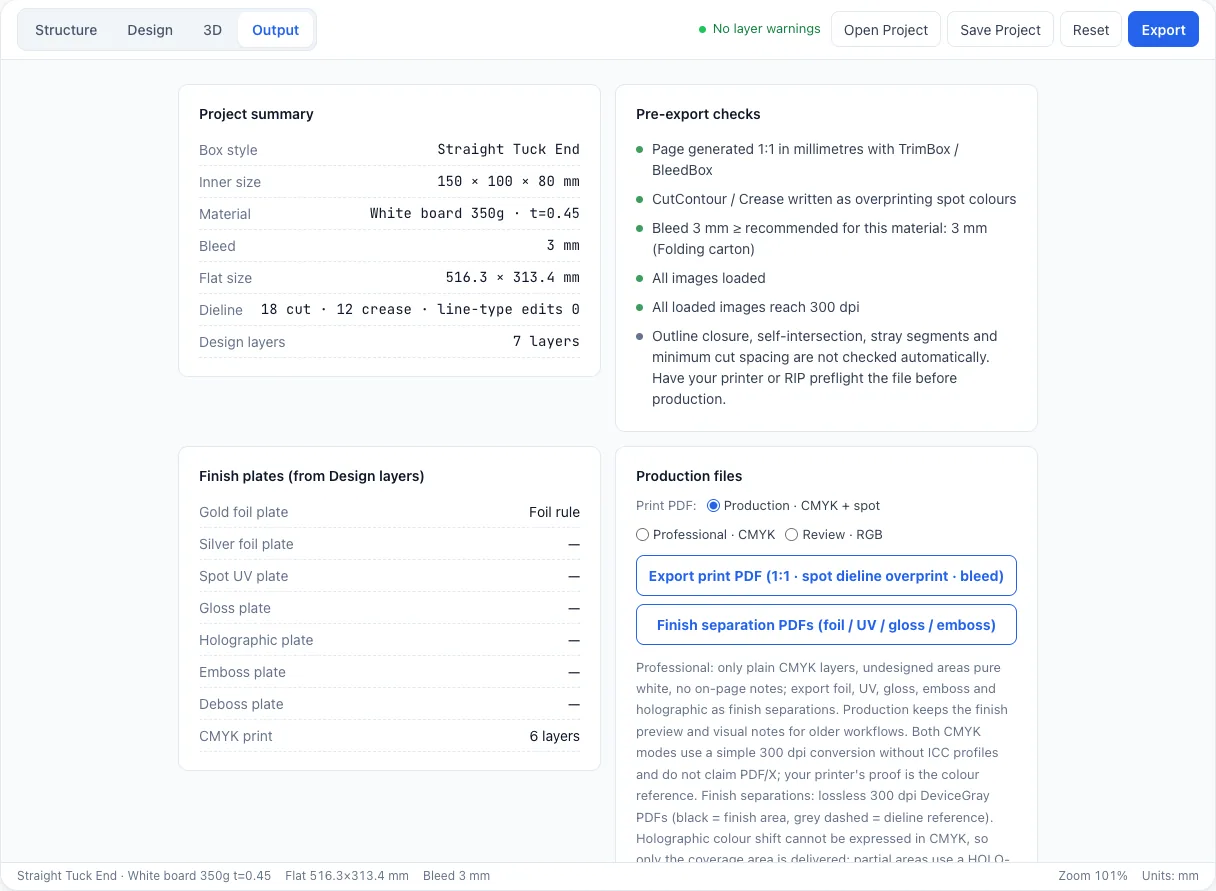
Review and export
Check the dieline details and export a PDF from the Output workspace. Free accounts get one watermarked RGB Review PDF; Starter and Pro can also save the project as a .boxproj file.
Open this step →
Explore what you can create
Five box structures cover common retail, shipping and gift packaging.

Folding cartons
Straight and reverse tuck end cartons with a glue flap, tuck lids and dust flaps for light retail products.
Open in editor →
Mailer boxes
A one-piece box with a hinged lid and tuck flap that folds together without glue.
Open in editor →
Gift boxes
A two-piece Lid & Base box, with the lid sized automatically to fit over the base.
Open in editor →
Drawer boxes
An inner tray that slides into an outer sleeve, with allowances for board thickness built in.
Open in editor →
Packaging prototypes
Try sizes, materials and artwork quickly and check each version in 3D before you order samples. On Starter or Pro, save each version as a project file.
Open in editor →
Powerful tools, one workspace
Structure, artwork, 3D preview and project files work together in the same editor.
Parametric dieline generator
Drawing a dieline by hand and redrawing it for every size change is slow and easy to get wrong.
Enter inside dimensions and a material, and the cut and crease lines update instantly with board thickness included.
Packaging artwork designer
It is hard to tell which panel artwork lands on once a flat layout is folded.
Place layers directly on named panels and get warnings when artwork crosses a crease, leaves the safe area or is below 300 dpi.
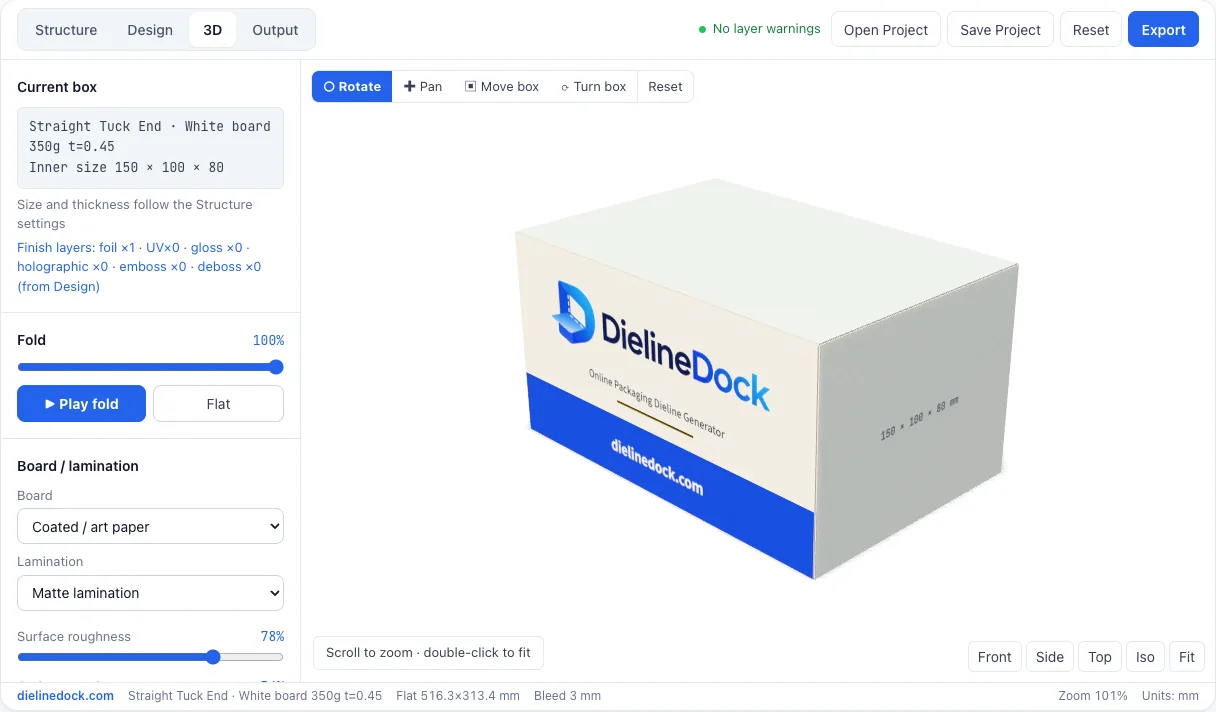
Real-time 3D fold preview
A flat layout does not show how the finished box will look on a shelf.
Use the fold slider or Play fold to see your box close in 3D and view it from any angle.
Material and finish preview
Foil, spot UV and laminations are hard to picture before anything is printed.
Preview board types, laminations and finishes like foil, spot UV, emboss and holographic under studio lighting.
PDF and print preparation
Print files need correct sizes, bleed and clearly marked cut and crease lines.
Run the pre-export checks, then export PDF pages at 1:1 in millimetres with TrimBox and BleedBox. Free includes one RGB Review PDF; CMYK, Professional and finish separation PDFs are part of Pro, which is not open for purchase yet.
Portable project files
Losing work, or being locked into an online account, makes iterating on packaging risky.
Open .boxproj files from your device any time, with no account required. On Starter and Pro, save everything to a .boxproj file without using a PDF export.
Which box style should you choose?
A quick comparison of the five box structures available in DielineDock.
| Box style | Typical use | How it closes | Pieces |
|---|---|---|---|
| Straight Tuck End | Light retail products such as cosmetics and small goods | Tuck lids at top and bottom, both from the front panel | One piece with glue flap |
| Reverse Tuck End | Light retail products, similar to straight tuck end | Tuck lids from opposite faces, top at back and bottom at front | One piece with glue flap |
| Mailer Box | Shipping, subscription and e-commerce boxes | Hinged lid with a tuck flap | One piece, no glue |
| Lid & Base | Gift and presentation boxes | Separate lid fits over the base tray | Two pieces |
| Drawer Box | Gift sets and premium small items | Inner tray slides into an outer sleeve | Two pieces |
No box style is universally better, so confirm your choice and material with your printer.
From screen to print
A short checklist to work through before you send files to your printer.
Check dimensions — confirm the inside length, width and height fit your product.
Check cut and crease lines — make sure each line is the right type, red for cut and green for crease.
Check bleed and safe area — extend backgrounds into the bleed and keep text and logos inside the safe area.
Check image resolution — use images that are at least 300 dpi at their printed size.
Choose a PDF output — use an RGB Review PDF to check the layout, and a CMYK Production or Professional PDF for your printer.
Confirm with your printer — agree on material, dieline conventions and a proof before production.
DielineDock helps you prepare design files; production feasibility must be confirmed by your print supplier. →
Who is DielineDock for?
Anyone who needs to plan a box before talking to a printer.
Small business owners
Plan packaging for your product and see how it looks in 3D before spending money on samples.
See use case →Packaging designers
Generate a dieline at exact millimetre sizes and place artwork panel by panel in one workspace.
See use case →E-commerce sellers
Size mailer boxes around your products and try different materials and artwork quickly.
See use case →Print shops and packaging teams
Mock up a box for a client, save a .boxproj file on Starter or Pro, and share it to discuss the structure and artwork.
See use case →Product designers and makers
Prototype packaging alongside your product and iterate on sizes as your design changes.
See use case →
Box templates
Five parametric box styles are available. Sizes are inner dimensions in millimetres.
- STE
Straight Tuck End
150 × 100 × 80 mm
Folding carton with both tuck lids on the same panel. Common for cosmetics, supplements and small retail goods.
Open in editor → - RTE
Reverse Tuck End
90 × 60 × 140 mm
Folding carton with the top and bottom tuck lids on opposite panels.
Open in editor → - MLR
Mailer Box
220 × 160 × 60 mm
One-piece corrugated box with a hinged lid and folded side walls. No glue needed.
Open in editor → - TDG
Lid & Base
180 × 120 × 60 mm
Two-piece tray with a separate lid sized 1 mm larger on each side.
Open in editor →
Pricing
Starter and Pro are not open for purchase yet. The Free PDF export works today after you sign in with your email.
Free
Explore Packaging Design
$0forever
Design your first packaging concept for free.
- Full Online Design Workspace
- Live 2D and 3D Preview
- Artwork and Material Editing
- Open .boxproj Project Files
- 1 Watermarked PDF Export
Starter
Most popularDesign & Review
$9.99/month
Create presentation-ready review PDFs.
- Everything in Free
- 20 Review PDF Exports / Month
- Watermark-Free RGB PDFs
- Editable Project File Export (.boxproj)
- Complete Artwork Editor
- Real-Time 3D Preview
Not open for purchase yet
Pro
Professional PDF Delivery
$19.99/month
Prepare print files for professional handoff.
- Everything in Starter
- 60 PDF Export Operations / Month
- CMYK Production PDFs
- Professional Clean PDFs
- CutContour / Crease Spot Colors
- Finish Separation PDFs
- No Platform Watermark
Not open for purchase yet
Starter and Pro are monthly subscriptions that renew automatically each month until you cancel. Cancel anytime in Plan & billing; your plan stays active until the end of the period you paid for. Unused exports do not carry over.
By subscribing you agree to the Terms of Service, Privacy Policy and Refund Policy. Payments are processed by Waffo Pancake.
Privacy
How your work is handled.
Designing and previewing happen in your browser, and your artwork and projects are not uploaded while you design. When you export a PDF, the rendered artwork is sent to our server to create the file.
On Starter and Pro, Save Project downloads your project file to your own device. We never store it.
If you create an account, we store the details needed to sign you in, and the PDFs you export so you can download them again.
Help & FAQ
Find answers about box styles, dimensions, 3D preview, project files, PDF export, plans and privacy.
Frequently asked questions
How do I create my first box?
Open the editor and pick one of the five box styles. Enter the inside length, width and height in millimetres and choose a material. The dieline and a small 3D preview update as you type, and you can then add artwork in the design workspace.
Should I measure the inside or outside of my box?
Enter the inside dimensions, the space your product needs. Measure your product and add the clearance you want around it. DielineDock then adds board thickness automatically to calculate the manufacturing size of each panel.
Does the 3D preview exactly match the physical package?
No. The 3D model is illustrative: it uses the same nominal length, width and height, but it is not built from the exact dieline geometry and flap shapes are approximated. Use it to judge proportions and artwork placement, and confirm the real structure with a physical sample from your printer.
What files can I export?
PDF only. In the Output workspace you can export an RGB Review PDF on any plan, and with Pro also a CMYK Production PDF, a Professional PDF and finish separation PDFs. Starter and Pro are not open for purchase yet. Starter and Pro can also save your work as a .boxproj project file. SVG, DXF, PNG and ZIP are not offered.
How many free PDF exports do I get?
One. The Free plan includes one RGB Review PDF per account verified with an email one-time code. It carries a DielineDock preview watermark and is a lifetime allowance: it does not reset, even after a paid plan ends.
Where is my design stored?
Your design stays in your browser while you work, and in any .boxproj files you save to your device on Starter or Pro. Projects are not stored in the cloud. When you export a PDF, the artwork rendered from your design and the box settings are sent to our server to create the file, and the PDF is stored privately with your account so only you can download it again from your export history.
Ready to design your packaging?
Start with a box structure, enter your dimensions, and preview your design.
Open Dieline Generator